Workspace Portal Documentation
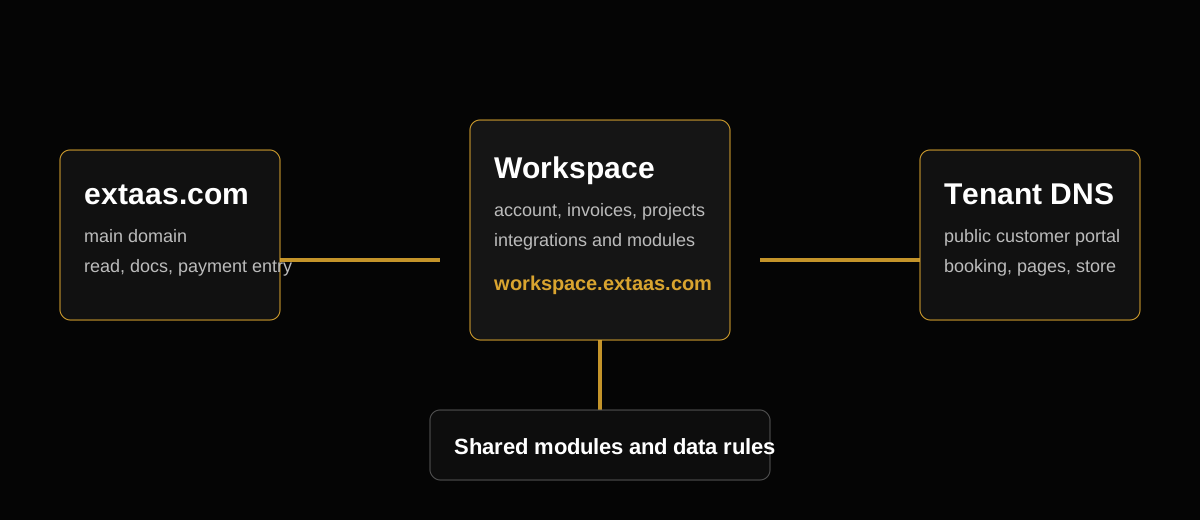
Operational documentation for workspace.extaas.com customers and staff. Workspace is the private portal for tenant modules, integrations, projects, invoices, credits and customer operations while tenant DNS pages remain public customer-facing surfaces.
Overview
Workspace is the control surface. It should answer four questions:
- Who owns this portal?
- Which tenant domains belong to it?
- Which modules are enabled?
- Which integrations and credits are required for those modules to work?
The public extaas.com site should not become an account dashboard. It can show documentation, marketing, public legal content and payment entry screens. Private data belongs in Workspace.
Workspace areas
| Area | Purpose | Public? |
|---|---|---|
| Account | User identity, sign-in and access | No |
| Projects | Customer work, delivery notes and linked services | No |
| Invoices | Invoice details, rows, payment status and receipts | No |
| Tenant portals | DNS routes, modules, public tenant settings | Partly |
| Integrations | Supabase, Resend, Stripe, OpenAI and module credentials | No |
| Credits | Balance, usage logs, top-up and refunds | No |
| Public Pages | Customer-facing content and media | Yes, only when enabled |
DNS and tenant routing
Every tenant domain must be represented in Workspace. The resolving logic should receive a host, find the matching workspace/tenant record and then render only that tenant's public data.
Checklist:
- The DNS record points to the tenant app.
- The same host exists in the workspace DNS route data.
- The route has a clear mode: tenant, public/self or internal workspace.
- Unknown domains do not leak another tenant's content.
- Localhost development can bypass the info screen only for developer convenience.
Modules
Modules should be reusable between tenant workspace and internal admin views where possible. Shared module logic avoids building the same tool twice.
| Module | What it manages | Key integration |
|---|---|---|
| Pages | Public content, media, redirects and page visibility | Supabase/media |
| Audience | Contacts, unsubscribe state and email segments | Supabase/Resend |
| Campaigns, templates, components and attachments | Resend/OpenAI | |
| Booking | Services, requests, status emails and calendar actions | Supabase/Resend |
| Rent | Rental items, requests, approvals and customer actions | Supabase/Resend |
| Store | Products, cart items and checkout result handling | Stripe |
| Calendar | Operational schedule and reminders | Supabase/Resend |
Integration rules
Keep secrets server-side. A module page may show whether an integration is configured, but it should never expose secret values.
- Supabase service role keys stay on the server.
- Resend API keys stay on the server.
- Stripe secret keys and webhook secrets stay on the server.
- OpenAI API keys stay on the server.
- Public tenant pages may receive only the safe, selected fields needed for rendering.
Credits and payment
Credits should be charged only for meaningful value events:
- Email: 1 credit per delivered recipient.
- Booking: reserve when accepted, capture when completed.
- Rent: reserve when approved, capture when completed.
- Store: capture after successful Stripe payment.
- Pages: daily credits for enabled public pages.
- Workspace: daily credits for active workspace access.
Editing templates, changing content, configuring modules and previewing data should not consume credits.
Customer actions
Emails can include customer action links. These links should be scoped, limited and safe:
- Cancel a booking.
- Cancel a rent request.
- Unsubscribe from audience emails.
- View a status page that does not expose private workspace data.
Operational FAQ
Why does a module show a setup state?
The module is enabled but one or more required settings are missing. The UI should explain the missing step instead of failing silently.
Why does a paid action pause?
Credits may be empty, the payment state may not be synchronized or Stripe webhook processing may have failed. Check Workspace credits, invoice status and logs.
Can staff use the same modules as tenants?
Yes. Shared modules should be adapted through props/data boundaries instead of duplicated. Tenant UI should keep its current UX, while admin/workspace views can reuse the stronger module logic.
What belongs in logs?
Store integration errors, credit reservations/captures, customer actions, email sends, booking/rent status changes and unexpected server failures. Do not log secrets.
Compliance readiness
The portal is designed around data minimisation, server-side secret handling, audit-friendly logs, WCAG-oriented contrast checks and least-privilege access. Formal ISO 27001, SOC 2 Type II or HIPAA claims still require organisational policies, contracts, risk registers and external audits.